

























Building an Adhan App in 2026: Features, Challenges, Cost, and Development Strategies
An Adhan app calculates daily prayer times for a chosen location. It lets users choose Adhan audio or quieter reminders. The schedule depends on the date, time zone, and the selected calculation method. Some users also need settings that match a local authority or personal practice.
Adhan app development starts with a scope decision. A focused prayer time tool has different needs from a wider Islamic platform with Qibla guidance, Quran content, and Ramadan planning. That choice affects features, technical design, testing, and ongoing costs.
This guide helps with planning a prayer or Islamic lifestyle application. It sets out the decisions to make before choosing features or requesting an estimate.
What Does an Adhan App Include in Its MVP?
An app’s MVP solves one daily problem well. Prayer app development starts with a clear audience and a defined source for local prayer times. The team sets that scope before choosing a long feature list.
Prayer time utility: Serves people who need daily times for a selected location and control over reminders.
Mosque or regional timetable: Displays a mosque’s published schedule and local updates for its community.
Broader Islamic platform: Combines prayer tools with Quran content, duas, a Hijri calendar, or Ramadan resources. This scope also requires decisions about content management and language support.
Before defining a minimum viable product (MVP), the team needs to confirm its audience, target regions, and source of prayer times. A local mosque app may use its published timetable. A global app may calculate times by location and offer method settings. These choices set a clear boundary for the MVP and its estimate.
Adhan App Features for Daily Prayer and Ramadan
In Adhan app development, features follow a user’s daily path: check prayer times, receive an alert, find a mosque, access worship tools, and plan for Ramadan. Grouping them by user need clarifies what belongs on the main screen and what needs a separate area.
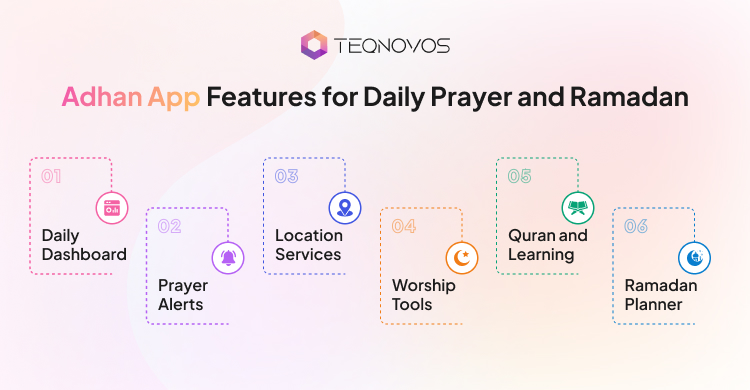
1. Daily Dashboard
Users often open the app for a quick time check. The dashboard puts today’s schedule and next prayer first, with sunrise and date details nearby.
- Daily timetable for Fajr, Dhuhr, Asr, Maghrib, and Isha
- Next prayer countdown on the home screen, widget, or lock screen
- Separate sunrise and sunset times
- Current Hijri date beside the Gregorian date
2. Prayer Alerts
Alert needs vary by prayer and situation. Separate settings give users control over Adhan audio, advance reminders, and quieter notifications.
- Selectable Adhan recording for each prayer
- Reminder before a chosen prayer
- Individual sound and notification preferences
- Silent, vibration, and alert settings for when the app is closed
3. Location Services
Location controls keep the schedule useful at home, while travelling, or when following a mosque timetable. Iqamah is the time set for congregational prayer and appears alongside local mosque timings.
- Automatic location detection or manual city selection
- Saved travel destinations with time zone updates
- Personal prayer time adjustments and mosque Iqamah timings
- Nearby mosque and halal food finder
4. Worship Tools
These utilities record personal practice and add functions beyond the daily timetable. Tracking features and calculators need clear controls over saved information and user entered details.
- Qibla direction through a compass or map
- Daily prayer tracking and a personal worship journal
- Zakat calculator with stated input assumptions
- Hajj and Umrah guides or checklists
5. Quran and Learning
Reading tools serve longer sessions, while reference features provide material users return to. Progress controls and offline access shape how people use these resources.
- Quran text with translation, audio, bookmarks, memorization progress, and offline reading
- Dhikr counter and Dua library
- Daily Hadith and the 99 Names of Allah
- Islamic learning guides or Q&A with reviewed sources
6. Ramadan Planner
Ramadan changes the timing and rhythm of daily use. A dedicated area brings fasting schedules, reminders, and monthly worship goals together.
- Suhoor and Iftar times with a Ramadan countdown
- Fasting reminders around Suhoor and Iftar
- Ramadan prayer, fasting, and Quran progress tracker
- Hijri calendar with important Islamic dates and local event reminders
How Prayer Time App Development Handles Calculation and Adhan Alerts
Prayer time results depend on coordinates, date, calculation method, and time zone. Alert scheduling also depends on the local date and user settings. These choices shape the scope of prayer time app development.
1. Method Settings
Different calculation methods produce different Fajr and Isha times. Asr also varies by the selected madhab, a school of Islamic jurisprudence. Clear settings let users choose an option that fits their location or practice.
- Set a regional default for the intended users.
- Display the selected calculation method.
- Let users change the method in settings.
- Explain Asr choices in plain language.
2. Location Changes
Prayer times depend on geographic location and date. A user selects a city if they do not want to share device location. Travel and daylight saving time changes affect the local time display. High latitude locations may need a calculation fallback when twilight conditions differ.
- Let users set or edit a city manually.
- Recalculate times after a location change.
- Display times in the selected location’s time zone.
- Define the high latitude fallback used by the app.
3. Qibla Direction
Qibla is the direction from a location toward the Kaaba. A phone compass uses device sensors and is affected by calibration or interference. Clear calibration guidance reduces the chance of presenting an unstable reading as precise.
- Calculate direction using the selected coordinates.
- Show calibration guidance when readings seem unstable.
- Explain when the compass reading may be unreliable.
- Offer a map or text direction as a fallback.
4. Time Validation
Calculated times need checks against known reference schedules. Each test needs a location, date, calculation method, time zone, and Asr setting. This record makes a mismatch easier to investigate.
- Compare results with a local timetable using the same method.
- Test multiple locations and dates.
- Check the next prayer at schedule boundaries.
- Record the reference source and expected differences.
5. Offline Alerts
On-device calculations return times without a network once location and method settings are available. An application programming interface (API) retrieves times from an online service. Caching covers connection gaps. A local notification is scheduled on the device, though the operating system and user settings affect delivery.
- Calculate times on the device or cache a schedule.
- Refresh times after a date, location, or method change.
- Let users control alerts and sound for each prayer.
- Explain how notification settings affect alert delivery.
Technology Architecture Behind an Adhan App
Adhan app development divides responsibilities across the mobile app, calculation engine, alert service, and any backend. Clear boundaries show which data stays on the device, which functions need network access, and what remains available when the connection drops.
1. Mobile Layer
The iOS and Android apps display schedules, settings, Qibla tools, and content. They also store local preferences and request location or notification permissions when needed.
2. Calculation Engine
A reusable engine takes coordinates, date, calculation method, and Asr convention as inputs. Isolating it lets the team test calculation changes without altering screens or account functions.
3. Location Services
Location services translate a selected place into coordinates and a time zone. The app refreshes the schedule when the selected location or local date changes.
4. Alert Delivery
The alert service schedules local notifications using prayer times and user settings. It reschedules after relevant changes. Push notifications handle server updates such as mosque timetable changes.
5. Backend Data
A focused prayer utility keeps preferences and calculations on the device. Accounts, synced settings, published mosque schedules, content management, or community features add backend services and database records.
6. Audio Delivery
Adhan recordings are bundled with the app, streamed, or downloaded. A catalog needs language and reciter details, storage controls, and permission to distribute each recording.
7. External Integrations
An application programming interface (API) connects services such as maps, location search, content, or analytics. The team defines transferred data, provider limits, update intervals, and a fallback before adding each integration.
8. Offline Operation
Local storage retains the current prayer schedule, preferences, and downloaded audio. After the device reconnects, the app refreshes data and syncs account changes without replacing newer local settings.
What Challenges Affect Reliability and User Trust?
Trust erodes when a timetable changes without explanation, an alert fails silently, or religious content lacks a clear source. In Adhan app development, each risk needs a visible safeguard, such as a setting explanation, manual control, consent choice, or source reference.
| Risk | Safeguard |
| Hidden calculation defaults make displayed times differ from a user’s local mosque schedule. | Show the active calculation settings and local adjustments. Let users review them. |
| Denied location access block automatic city selection. | Explain why location is requested and keep manual city entry available. |
| Travel or a clock change leaves the schedule tied to an old city or date. | Refresh the schedule after location or date changes. Display the selected city and time zone. |
| Phone permissions, Focus modes, or battery settings silence or delay notifications. | Show notification permission status and explain relevant device settings. Avoid promising guaranteed delivery. |
| Adhan recordings may be used beyond their distribution terms. | Track each recording’s source, permitted use, attribution, and renewal terms. |
| Stored or shared coordinates expose a user’s routines. | Collect only necessary location data. Explain its use, get consent, set retention limits, and offer deletion. |
| Incorrect or unattributed religious material undermines trust. | Record the source and edition. Distinguish original text from translations or commentary, and identify the review owner. |
How To Build An Adhan Application Step-by-Step?
In Adhan app development, the timeline follows decisions that carry through each stage. Total duration depends on the agreed scope, number of platforms, integrations, and store review cycles. The stages below show the work sequence without promising a fixed number of weeks.
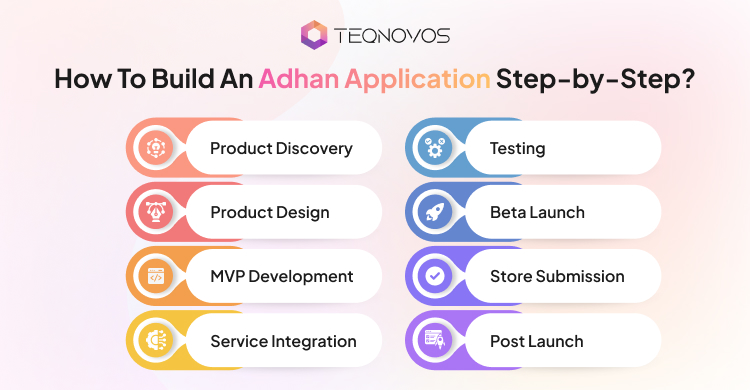
1. Product Discovery
Discovery defines the target users, launch regions, languages, calculation sources, and release scope. The product brief captures these decisions and sets out how the team will validate them, using a structured software product development strategy.
2. Product Design
UI/UX design services turn the brief into onboarding, location, settings, and alert flows. Clickable prototypes expose navigation problems before development begins.
3. MVP Development
The minimum viable product (MVP) takes shape around the agreed core functions. Incremental builds bring the prayer schedule, settings, and local alerts together for review.
4. Service Integration
The team connects approved services such as maps, content management, analytics, or account sync. Each application programming interface (API) needs a defined data exchange and a fallback for service failures.
5. Testing
The team compares schedules with approved references across target cities and dates. Testing also checks travel, time zone changes, offline use, denied permissions, and alert behavior on supported devices.
6. Beta Launch
A test build goes to a defined user group. Their feedback reveals unclear timetable details, alert issues, or setup problems. The team resolves release blockers before store submission.
7. Store Submission
The team prepares store copy, screenshots, privacy disclosures, permission explanations, and support details. It checks Apple App Store and Google Play requirements and allows time for reviewer questions or resubmission.
8. Post Launch
After release, the team reviews crash reports, support requests, and feedback on core workflows. It prioritizes scheduled or alert defects, then plans operating system updates, service changes, and content maintenance.
What Affects Adhan App Development Cost?
Adhan app development cost depends on the product scope and the work needed to keep its schedules and alerts reliable. A focused prayer timer needs less infrastructure than an app with regional mosque schedules, audio libraries, user accounts, and content management.
How Islamic App Development Cost Changes With Scope
In prayer app development, adding mosque timetables or Iqamah schedules requires regional data and administrative tools. A broader platform may also need backend services, licensed audio, offline downloads, and translated content.
| Product scope | Published cost examples | Published timeline examples |
| Focused prayer time MVP | About US$3,500 for one single-purpose prayer companion package; US$8,000 to US$25,000 in a separate custom Azan app estimate | 4 to 6 weeks for the package; 3 to 6 months for the custom app estimate |
| Regional mosque app | US$5,000 to US$18,000 across published mosque app estimates | 8 to 12 weeks in one custom mosque app estimate |
| Broader Islamic platform | US$15,000 to US$75,000 across feature-rich prayer and devotional app estimates. Advanced multi-feature religious platforms exceed US$150,000 | 4 to 6 months for a prayer or devotional app; 9 to 15 months or more for an advanced platform |
Treat these as examples for planning, not as a quote or market average. The estimates come from different vendors and regions, with different feature assumptions. An Islamic app development cost estimate becomes more useful when each workstream is scoped separately:
- Calculation methods, regional settings, and testing prayer times across locations.
- iOS and Android builds, device testing, and notification behavior.
- Backend services for accounts, synced settings, mosque schedules, and content management.
- Audio rights and storage, offline access, language support, quality assurance, and ongoing maintenance.
What a Cost Estimate Needs to Include
A quote needs to state what the price and delivery schedule cover. A second Islamic app development cost estimate is useful only if it uses the same assumptions.
- Supported platforms and whether the build is native or cross platform.
- Included features, calculation sources, integrations, and administrative tools.
- Languages, approved content, audio licensing, and offline downloads.
- Testing scope, app store submission, post launch support, and maintenance terms.
What Needs to be Maintained After Launch?
Prayer schedules, alerts, and content are affected by changes to mobile operating systems, calculation libraries, and third party APIs. Teams plan for this work during Adhan app development by assigning ownership for updates and issue handling before release.
Maintenance includes updating calculation libraries or APIs when versions or regional data change. After operating system updates, the team tests notifications, location access, and audio playback. Regular reviews also cover religious content, Adhan recording rights, bug reports, and user feedback.
The maintenance plan depends on the app’s architecture and scope. A documented application maintenance plan sets out who handles fixes, testing, and planned upgrades.
Conclusion
An Adhan app is more than a notification tool. Accurate prayer times and dependable alerts should form its foundation. Prayer time app development starts with a focused minimum viable product (MVP) shaped by how users choose locations and follow local schedules.
Plan for regional calculation differences and protect location data. A modular architecture lets the product add languages and services as needs grow without replacing its core. Set a maintenance plan for operating system updates and user feedback.
Build your application with Teqnovos. Connect with us to get started!